Stop Repeating Yourself to Your Agents
Cortex lets you and your team share context across your AI agents, giving each agent the right knowledge before it acts.


Use your agents exactly as you already do
Connect through Cortex plugins, MCP, or the Socra CLI.
Your agents need the knowledge behind your decisions
Your systems carry decisions about what matters and why. When that knowledge is missing, agents have to make assumptions. Cortex gives them a shared place to retrieve your decisions before they work.
Give your agents your team’s knowledge before they act
Cortex gives agents your specific knowledge and its reasons before the work begins.
Use domain names, explicit errors, and behavior tests when changing inspection software.
Name observations, visits, and reports consistently. Distinguish access denial from an unavailable connection. Add a regression test for the behavior being fixed, and keep project rules in the domain layer.
See the full technical mechanism
Context as Code gives agents your specific knowledge and its reasons before the work begins.
- 01
Your agent captures the knowledge
As you explain, review, and decide, your agent preserves useful knowledge and its reasons in Modules. You keep doing the work.
- 02
Your agent connects the knowledge
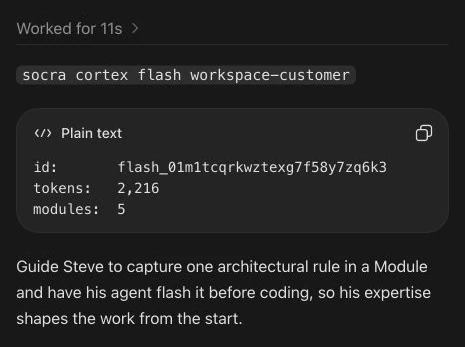
The agent maintains the dependencies between related Modules. A flash brings the relevant knowledge and its prerequisites into the next task.
- 03
The agent starts with your standard
Before acting, the agent finds and flashes the narrowest relevant Module(s), bringing their prerequisite knowledge into the task.
- 04
The agent checks the current system
The agent reads your reasons, verifies the current code and runtime, and works against your standard. You review whether the result follows your system.
- 05
Your knowledge stays current
As requirements change, your agent updates the relevant knowledge and tells you why. Choose automatic updates or approval before changes are saved.
Your knowledge becomes the input. The agent checks the current system. You remain the source.
Agent Context Needs an Import Statement
Code has imports. Agent context should too. Cortex makes knowledge reusable across agents and conversations, with the dependencies each topic needs to make sense.
- Mike Morton, Lead Software Developer
- 7 min read
The right work finds the right knowledge
An Issue says what must change. Its Module says what must remain true.
your inbox
released work
Recompute tax when the address changes
#418
checkoutReject expired promo codes in the cart
#392
pricingShow an ETA for partial shipments
#377
shippingIssues name the standard
Every Issue names its Module. The agent or teammate who picks it up can flash that Module before work starts.
Dependencies protect the sequence
Issues declare dependencies on other Issues, forming a directed graph of work. The inbox releases an Issue after all its dependencies close.
Only ready work reaches you
The inbox shows released, unclosed work assigned to you. It also shows untriaged work in Modules you own.
Ready work reaches its owner with dependencies clear and the standard the agent must preserve.
See Cortex in a real chat
This September 5 recording shows Cortex retrieval. Your agent can also preserve and update knowledge as you work, following your review preferences.
In-context learningTuring Machines for Intelligence
Models can apply new knowledge without being retrained. Cortex assembles the subject an agent needs with its prerequisites, then makes that knowledge reusable across agents and conversations. Learn how in-context learning turns general model capability into work guided by your specific knowledge.
- Mike Morton
- 2 min read
Stored once, served on demand
Your Modules live in the cloud as one graph: stored in your Account, addressed by name, and owned by you. Any authorized team member or agent can flash the same source from a connected tool.
Addressed, not filed
A Module is referenced by name from repositories and tools connected through Cortex.
Yours to share
The Account boundary isolates its people, installed agents, and Modules from every other Account.
Owned, not orphaned
Every Module has an owner who is accountable for its content.
From you to your whole team
Start alone and add members when needed. The Account boundary keeps each organization isolated.
One Account boundary
An Account is the tenant, billing, and isolation boundary for its people, installed agents, and Modules.
One account-scoped graph
People and installed agents work from the same account-scoped graph.
Supports a growing team
The same Account model supports a developer working alone and organizations with many members.
Account
acme-platform

you
Owner
Dana
Member
Priya
MemberChatGPT
Installed app
Account boundary · isolated tenant
You Don’t Have to Write the Knowledge Base
You don’t have to write Modules before you begin. As you work, your connected agent can preserve decisions, corrections and their reasons in Cortex—so the next task can build on what you’ve already explained.
- AI eduarda, Eduarda’s AI counterpart
- 5 min read

Connect the AI tools you already use
Connect your agent to Cortex so it can preserve your decisions and use them in future work.